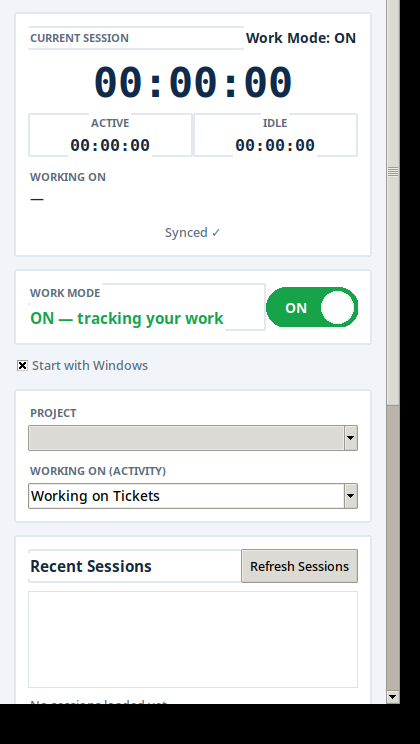
One-tap timer toggle
A big ON/OFF switch. Agents tap once to start work and once to stop. The timer also stops by itself when the computer is locked.
Time tracking & team monitoring
WorkSathi is a simple time tracker for Windows. Your agents switch one toggle ON when they start work — and you see live hours, screenshots, tasks and reports from anywhere.
Features
No spreadsheets. No chasing people for updates. WorkSathi quietly records the workday and shows it to you clearly.
A big ON/OFF switch. Agents tap once to start work and once to stop. The timer also stops by itself when the computer is locked.
Screenshots are taken silently at random times — so the workday is captured honestly. Only the owner can see them.
See who is working right now, what app or website they are on, and how many hours each person has done today.
Assign tasks with a set time. See what is pending, in progress or completed — and whether it finished on time or late.
If an agent forgets to turn the timer ON, they can submit a time claim. Only the owner approves or rejects it.
Time tracker, productivity breakdown, activity log, web & apps, attendance and daily time entry — with date filters.
Owner, Manager and Agent roles. Managers see only their own team — and never screenshots. Agents see only their own data.
Add as many agents as you need — there is no per-agent limit. Everything runs in the cloud, so it is live day and night.
Your dashboard
Open the dashboard in any browser — or check the team from the phone app while you are away.
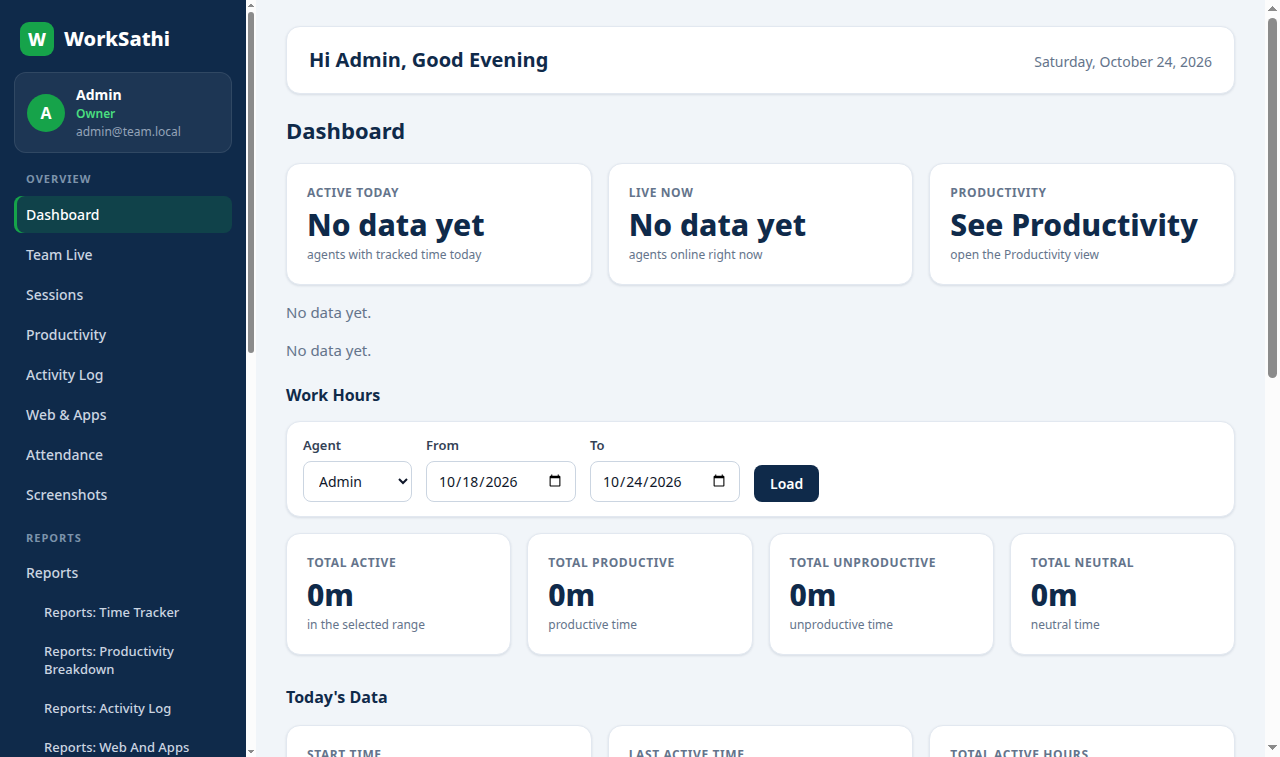
Privacy by design: screenshots are visible only to the owner. Agents never see screenshots — not even their own.
How it works
Contact us, pay on UPI, and we activate your workspace. You get your own admin dashboard — separate from every other business.
Each agent installs the Windows app, creates their own account and logs in once. You approve them once from your dashboard — then they just switch the timer ON every day.
See live hours, screenshots, tasks and reports on the dashboard — from any browser, or from the manager app on your phone.
Plans
Priced per user, per month. Add as many agents as you need — there is no cap on team size.
₹249 /user/month + GST
Billed monthly — ₹249 per user + GST
Most flexible
₹219 /user/month + GST
Billed every 6 months — ₹1,314 per user + GST
₹199 /user/month + GST
Billed once a year — ₹2,388 per user + GST
Prices are per user, per month. GST is extra on top of these prices. The 6-month and yearly totals shown are the per-user price for the full billing period, before GST. Contact us to start your plan.
How to pay
Pick your plan, scan the QR code and share the payment screenshot — we activate your workspace and send your admin login.
Choose your plan
GST is extra on top of these prices. The total shown is before GST.
Scan to pay

GPay · PhonePe · Paytm · BHIM
Or pay to this UPI ID:
murtza9711@oksbi
Open any UPI app and scan the code above — or pay to the UPI ID instead.
Send the payment screenshot on WhatsApp so we can confirm your payment.
We activate your workspace and send you your admin login. Your agents can then install the app and start work.
About WorkSathi
WorkSathi started as the in-house tool of a small Indian support team that needed a simple, honest way to track remote work — without costly software or complicated setup. Today it is a full product for any business with a remote team: one toggle for the agent, one clear dashboard for the owner.
We keep it simple on purpose: one clear per-user price, no laptop that must stay switched on, and no screenshots ever shown to the wrong person.
Contact
Tell us about your business and we will set up your workspace.
FAQ
Yes — every new workspace starts with a 3-day free trial with full access. No payment is needed to start. After the trial, pick a plan and pay by UPI to continue.
No. Every plan includes unlimited agents — add your whole team, however big it grows. You pay per user, per month.
Only the owner (admin) of your business. Managers never see screenshots, and agents never see screenshots — not even their own.
No. WorkSathi runs in the cloud, 24×7. Your agents only need the Windows app on their own computers.
Each agent creates their own account in the app. You approve them once from your dashboard — after that they log in and switch the timer ON each day. A login stays active for 30 days.
Pay on UPI, share the payment screenshot on WhatsApp, and we activate your plan. Monthly, 6-month and yearly plans are available.